
Overview
If you’re having trouble logging into your When I Work account, follow the steps in this article to troubleshoot and get back into your account.
An “incorrect username or password” message appears
The app displays an “Incorrect username and/or password” message at the top of the screen when you log in with the wrong email address or password.
Possible cause: Using the wrong password
If you know which email address you used to sign up for When I Work but you’re receiving the “Incorrect username and/or password” message, you might be using the wrong password.
Solution: Reset your password, then try logging in again. The resetting password article also includes steps to take if you can’t reset your password!
Possible cause: Using the wrong email address
If you know your password but you’re receiving the “Incorrect username and/or password” message, you might be using the wrong email address.
Solutions:
- Try another email address you might have used to register your When I Work account.
- Ask your manager what email address is listed in your user profile, then try logging in again.
Possible cause: Not using Google to sign in
If you’ve opted to sign into When I Work using your Google account, you won’t be able to log in using the email address and password fields. Check out Google Login for more information on logging in using your Google account.
Solution:
- Make sure you’re logged into your Google account in the browser you’re using to access When I Work.
- Click Google icon Log in with Google on the login screen.
- If this still isn’t working, try disconnecting your Google account and then log in with your username and password.
Possible cause: Not using Apple to sign in
If you’ve opted to sign into When I Work using your Apple account, you won’t be able to log in using the email address and password fields. Check out Signing in with your Apple ID for more information on logging in using your Apple account.
Solution:
- Make sure you’re logged into your Apple account in the browser you’re using to access When I Work.
- Click Sign in with Apple
Possible cause: Requesting a password reset for the wrong email address
If you receive an email letting you know there isn’t a When I Work account associated with that email address, you’ll need to make sure you request the password reset using the correct email address.
Solution: Follow steps for what to do if you can’t reset your password.
I’m logged in, but I do not see my workplace
Your email address is what connects you to your workplace. If you don’t see your workplace when you log in, check the possible cause below.
Possible cause: Not logging in with the correct email address
If you see the screen below when you log in, you might be using a different email address from the one connected to your workplace.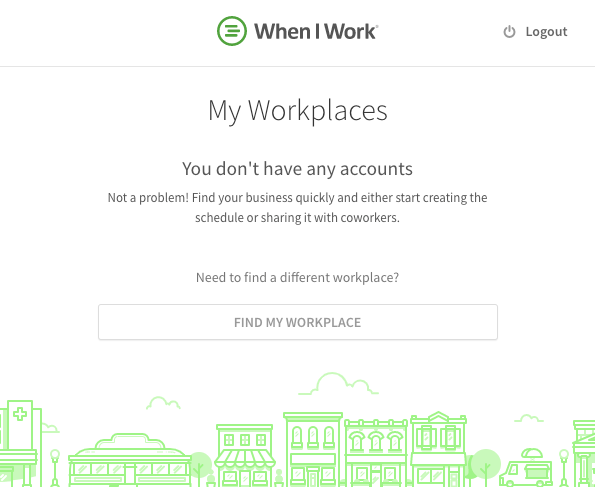
Solutions:
- Try a different email address you might have used to register your When I Work account.
- Ask your manager what email address is listed in your user profile, then try logging in again.
- Use the Find My Workplace option to search for and request to join your workplace.
- You may also use the Find My Invite option on the mobile application to search for an invite your manage sent you.
** Do not create a new workplace unless you are an Admin and want to start a new account for your team.
I’m logged in, but it says my profile is pending
When you register to a workplace without an invite, your profile is pending until a manager approves your request to join the workplace.
Possible cause: Your manager hasn’t approved your request
managers are notified when a user requests to join their workplace and need to approve the pending request before the user is able to access their profile.
Solutions:
- If you do not already have a registered profile, ask your manager to approve your pending request to join the workplace.
- They also have the option to merge your profile if this is the username you want to log in with moving forward.
- If you already have a registered profile, you may be logging in with the wrong email address. Try to log in with a different email address, or ask your manager what email address is listed in your user profile.